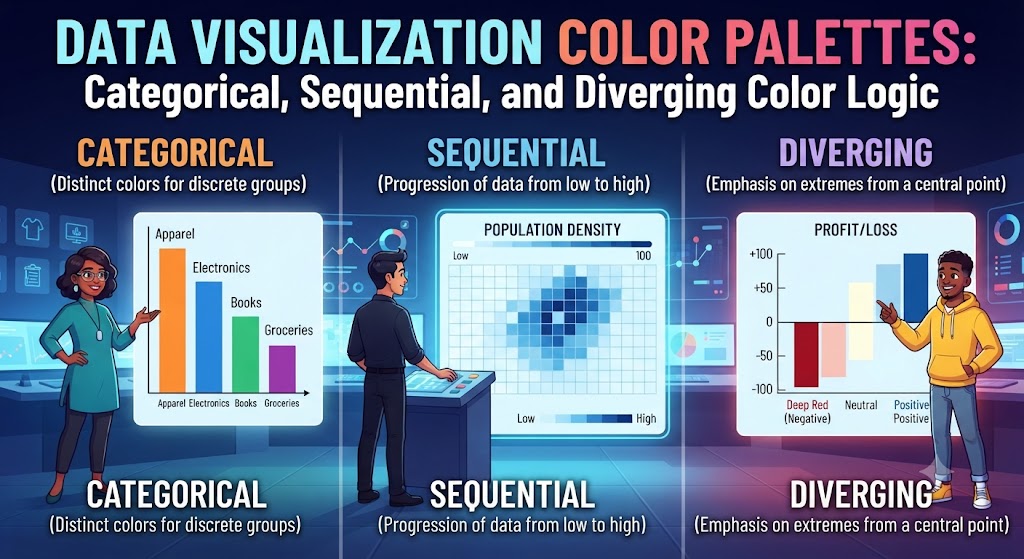
Data Visualization Color Palettes: Categorical, Sequential, and Diverging Color Logic
In data-driven user interfaces and analytical software platforms, color functions as an instantaneous data encoder. Long before a user reads table legends, metric axes, or numerical data points, their visual cortex has already grouped categories, interpreted quantitative scales, and identified critical anomalies based purely on color. When executed correctly, color enables immediate cognitive comprehension; when chosen carelessly, it actively misleads users, distorts data relationships, and causes severe analytical misinterpretations.
Many digital dashboard designers treat charting colors as decorative visual accents, applying random gradient packs or brand accent tones that create false visual relationships. Professional data visualization requires a structured mathematical framework: categorizing data types into Categorical, Sequential, and Diverging systems, enforcing perceptual uniformity across luminance channels, and maintaining strict colorblind accessibility. In this definitive guide, we analyze the functional mechanics of data color palettes, supply verified production-grade token scales with exact HEX values, examine colorblindness emulation, and deliver production CSS implementations for charting engines.
1. The Three Foundational Data Color Archetypes
Every quantitative visualization system maps data into one of three core mathematical structures. Applying the wrong palette archetype to a dataset creates immediate cognitive friction:
1. Categorical (Qualitative) Palettes
Categorical palettes are deployed when data divides into discrete, non-numerical buckets with no intrinsic hierarchy, ranking, or ordering (e.g., regional sales territories, product categories, or marketing channels).
- Mathematical Constraint: Hues must be widely distributed across the color wheel to ensure instantaneous differentiation, while maintaining similar perceptual lightness and chroma.
- The Cardinal Rule: No single color should possess greater optical weight or saturation than another; otherwise, users unconsciously assign higher importance or urgency to that specific category.
2. Sequential Palettes
Sequential palettes represent numeric variables that progress systematically from low to high (e.g., population density, page load times, or revenue volume).
- Mathematical Constraint: Lightness ($L$ in OKLCH or CIELAB) must progress monotonically from light to dark (in light mode) or dark to light (in dark mode).
- Perceptual Uniformity: The perceived color distance ($\Delta E$) between step 1 and step 2 must mathematically match the distance between step 4 and step 5.
3. Diverging Palettes
Diverging palettes highlight numeric variance moving in two opposite directions from a meaningful, neutral baseline or midpoint (e.g., net profit vs loss, performance above/below a KPI target, or trade balance surplus vs deficit).
- Mathematical Constraint: Two contrasting hues converge at an unsaturated, neutral midpoint (such as light gray, soft cream, or pure white), with luminance stepping symmetrically outward in both directions.
2. Curated Production-Grade Palettes with Exact HEX Tokens
Below are production scales engineered specifically for charting libraries (Chart.js, D3.js, Recharts, and Apache ECharts).
Palette 1: Enterprise Categorical 8-Hue Scale (High Differentiation)
Engineered for complex multi-line charts and bar graphs, calibrated to provide maximum differentiation without visual clashes.
| Token Name | HEX Code | RGB Value | Role / Recommended Assignment |
|---|---|---|---|
| Data Blue | #2563EB | rgb(37, 99, 235) | Series 1 (Primary Category) |
| Data Teal | #0D9488 | rgb(13, 148, 136) | Series 2 (Secondary Category) |
| Data Amber | #D97706 | rgb(217, 119, 6) | Series 3 (Tertiary Category) |
| Data Violet | #8B5CF6 | rgb(139, 92, 246) | Series 4 (Technical/Operations) |
| Data Pink | #EC4899 | rgb(236, 72, 153) | Series 5 (Engagement / Conversions) |
| Data Emerald | #10B981 | rgb(16, 185, 129) | Series 6 (Organic Inflow) |
| Data Orange | #F97316 | rgb(249, 115, 22) | Series 7 (Outbound Leads) |
| Data Slate | #64748B | rgb(100, 116, 139) | Series 8 (Miscellaneous / Other) |
Palette 2: Oceanic Sequential 6-Step Scale (Density & Choropleth Maps)
Perceptually linear blue progression for geographic maps, heatmaps, and financial volume matrices.
| Step Level | HEX Code | RGB Value | Luminance Tier |
|---|---|---|---|
| Step 1 (Lowest) | #EFF6FF | rgb(239, 246, 255) | Lightness 96% |
| Step 2 (Low-Mid) | #BFDBFE | rgb(191, 219, 254) | Lightness 85% |
| Step 3 (Moderate) | #60A5FA | rgb(96, 165, 250) | Lightness 68% |
| Step 4 (High-Mid) | #2563EB | rgb(37, 99, 235) | Lightness 52% |
| Step 5 (High) | #1D4ED8 | rgb(29, 78, 216) | Lightness 40% |
| Step 6 (Peak) | #172554 | rgb(23, 37, 84) | Lightness 22% |
Palette 3: Precision Diverging Scale (Symmetric Performance Variance)
An accessible Crimson-to-Emerald diverging scale with a clean, neutral slate midpoint for variance tracking.
| Variance Role | HEX Code | RGB Value | Functional Significance |
|---|---|---|---|
| Severe Deficit (-100%) | #DC2626 | rgb(220, 38, 38) | Critical Target Miss |
| Moderate Deficit (-50%) | #F87171 | rgb(248, 113, 113) | Below KPI Horizon |
| Baseline Point (0%) | #F1F5F9 | rgb(241, 245, 249) | Parity / Neutral Target Horizon |
| Moderate Surplus (+50%) | #34D399 | rgb(52, 211, 153) | Above KPI Horizon |
| Major Surplus (+100%) | #059669 | rgb(5, 150, 105) | Target Exceeded |
3. Colorblind Accessibility: Beating the Red-Green Blindness Trap
Approximately 8% of men and 0.5% of women worldwide experience color vision deficiency (CVD), with Deuteranopia (green-blind) and Protanopia (red-blind) being the most prevalent. The standard design choice of pairing pure red with pure green without secondary indicators makes charts completely unreadable for millions of operators.
The Dual-Encoding Principle
To ensure universal accessibility in data products:
- Shift from Red/Green to Blue/Orange: Blue and Orange occupy opposite ends of the colorblind visual perception spectrum, remaining distinct across Protanopia, Deuteranopia, and Tritanopia.
- Pair Hues with Visual Textures: For print outputs and high-security displays, combine colors with SVG fill patterns (diagonal hatches, dots, cross-hatching).
- Implement Direct Value Labels: Never rely exclusively on hover tooltips or distant color swatches. Place clear numeric labels and directional arrows ($+$, $-$) directly adjacent to charting bars and data lines.
4. Production CSS Implementation: Chart Tokens & Bar Visualization
Below is a production CSS setup establishing chart tokens alongside an accessible HTML bar chart component:
5. The “Rainbow Map” Fallacy: Why Jet & Rainbow Colormaps Distort Data
For decades, scientific visualizations and dashboard tools defaulted to the classic “Jet” or “Rainbow” colormap (transitioning through royal blue, cyan, yellow, orange, and red). Modern vision science has thoroughly debunked this approach.
The Illusion of False Boundaries
The human eye does not perceive changes in the electromagnetic spectrum uniformly. The transition from yellow to green creates a sharp perceptual boundary where none exists in the underlying numerical dataset. Conversely, wide stretches of pure green absorb large numerical shifts without registering a noticeable optical difference.
Modern analytical engines should replace Rainbow and Jet colormaps with mathematically linear palettes like Viridis, Plasma, or uniform single-hue sequential scales, which ensure that visual color shifts match actual numerical changes step for step.
6. Final Production Checklist for Data Visualization Palettes
- Identify the data structure first: choose categorical for qualitative categories, sequential for numerical rank, and diverging for variance around a midpoint.
- Limit categorical palettes to a maximum of 7 or 8 distinct hues to prevent cognitive overload.
- Ensure sequential palettes progress in a monotonic lightness curve from light to dark (or vice versa).
- Replace standard red-green diverging scales with colorblind-safe blue-orange alternatives whenever possible.
- Never rely entirely on color alone: provide direct labels, numeric readouts, and clear tooltips.
By treating data color selection as an exact information architecture discipline rather than superficial styling, you create visualization interfaces that turn complex datasets into clear, reliable, and actionable human insights.